



- installation guide
- delegation
- monitoring
- security hardening
- tooling
- skill
TheGraph-Indexer-Setup
A guide to installing from scratch, how to install an indexer on the main network
Read first: Graph Horizon is live
The protocol runs on Arbitrum One, and Graph Horizon changed how stake, allocations and payments work. The steps below still describe the correct installation flow, but keep these current rules in mind:
- Stake, then provision. Staking GRT is no longer enough. Stake must be explicitly assigned to a data service —
SubgraphService— before it can back allocations. Registration happens with the data service itself, not with the old ServiceRegistry contract.- GraphTally (TAPv2) only. The gateway serves queries exclusively against TAPv2 receipts.
indexer-service-rsandindexer-tap-agentmust be v2.0.0 or later with Horizon enabled. An un-migrated stack receives no queries at all.- Allocations can stay open. Rewards are collected by submitting POIs periodically; closing is no longer required. But a POI must land within
maxPOIStaleness(28 days) or any network participant can force-close the allocation, and the uncollected rewards are lost with no retroactive recovery. Current agent versions still recycle allocations on roughly the old cycle.- Rewards also require eligibility. Under GIP-0079 an Indexer must serve qualifying queries on at least 5 days in a rolling 28-day window. See the Monitoring tab.
- Reward and query fee cuts are set per data service, not as global staking parameters.
Horizon overview: https://thegraph.com/docs/en/graph-horizon/overview/ · migration guide: https://thegraph.com/docs/en/graph-horizon/migration-guide/
Companion tabs: Delegation · Monitoring · Security hardening · Tooling · Skill
Pre-requisites
- Dedicated server (16 Core, RAM 128Gb, 2Tb nvme)
- Domain like https://web3validator.info/
- 100,000 GRT for indexing (the current minimum Indexer stake)
- A 12-word mnemonic phrase in order for it to work
- An Arbitrum One archive RPC supporting EIP-1898 — not part of this stack
- ETH on Arbitrum One in the operator wallet, for gas
1)Server
Server must be with minimum 12-core proccessor and 64gb RAM , good example is AX101 in hetzner you can check the step-by-step guide here
2)Domain
Domain you can buy on imena.ua and step-by-step guide here
After you bought a domain, you need to make dns records indicating the ip address of your server , it looks like this:


3) 100,000 GRT for indexing
100,000 GRT need for create indexer , you can buy it through the CEX like Binance, Coinbase or Kucoin and in DEX like Uniswap, Sushiswap and etc.
4) A 12-word mnemonic phrase
You need a wallet with a seed phrase that is registered as your operator wallet. This wallet will be the one that makes transactions on behalf of your main wallet (which holds and stakes the GRT).
The operator wallet has limited functionality, and it's recommended to be used for security reasons.
You need a 12-word, or 15-word mnemonic phrase in order for it to work.
To make yourself a mnemonic eth wallet you can go to this website, select ETH from the dropdown and press generate.
You get a seed phrase in the input field labeled BIP39 Mnemonic.
You can find your address, public key and private key in the first row of the table if you scroll down the page in the section with the heading "Derived Addresses".
Make sure you save the mnemonic, private key and the wallet address somewhere safe.
If you need, you can import the wallet using the private key into Metamask
Install from scratch
Stake on the Network
In order to become an indexer on the Graph Protocol Network, you'll have to stake a minimum of 100,000 GRT.
This can easily be done via the Web UI, by going to the Graph Explorer.
-
Login with Metamask on the Wallet that holds your GRT
-
Go to your Profile, then switch to the "Indexing" Tab and hit "Stake"
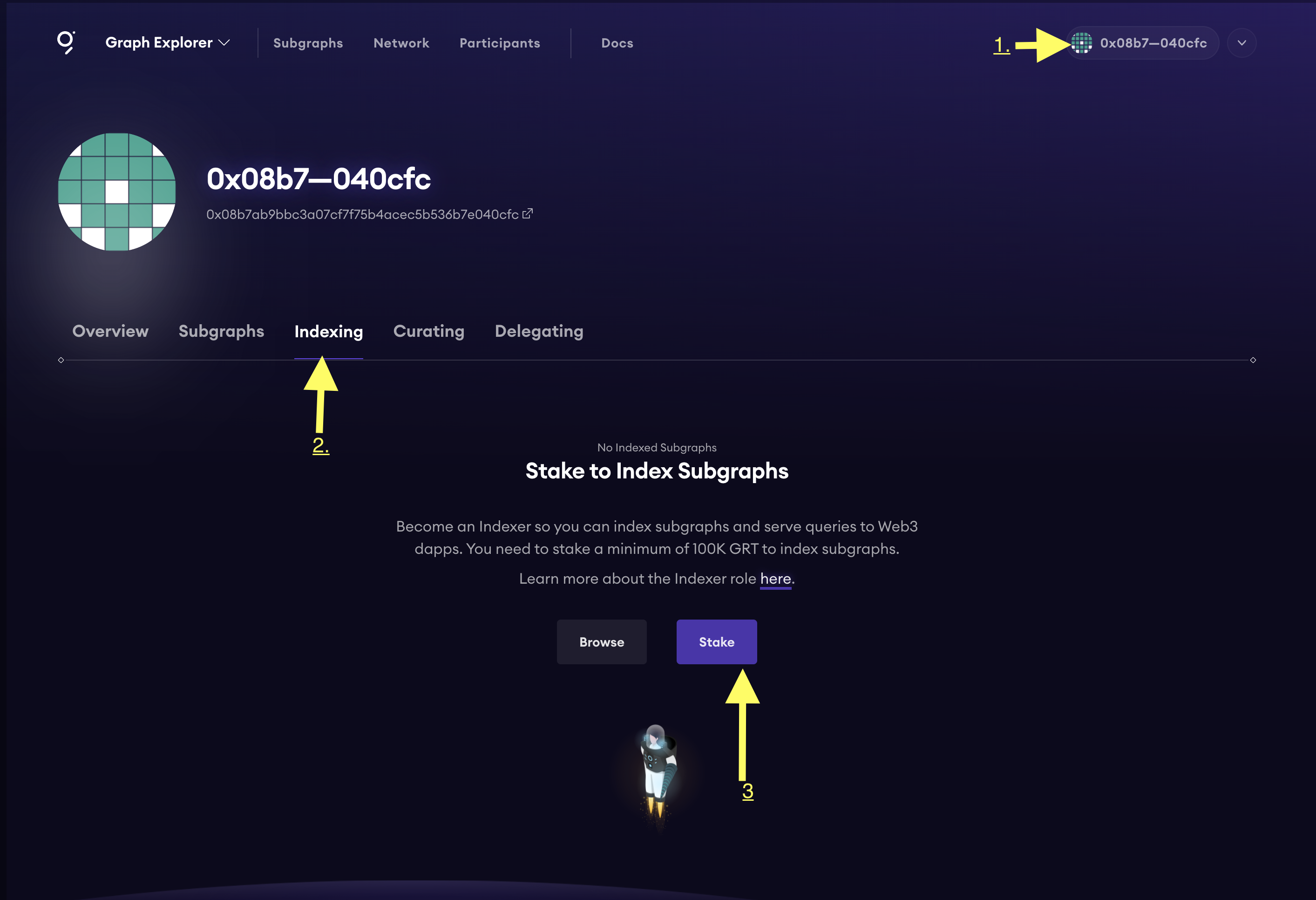
- Stake the amount of GRT that you desire, then you're all done!
Set your Operator
The Operator is a wallet address that is entirely separate from the address which you staked your GRT from. This Operator wallet will be filled with ETH, and will be used to send transactions (such as allocations) to the network, while keeping your Staked GRT safe in case of an attack on your infrastructure. It is highly recommended for you to use a new wallet, generated from a new mnemonic phrase.
For this, follow the instructions here first, then head back for the rest.
Okay, assuming that you followed the instructions and you have your new Operator wallet at hand, lets go and link it up with the wallet that you used to stake your GRT.
Login with Metamask on the wallet that you used to stake your GRT
4. Click the Profile dropdown button
5. Go to "Settings", and then to the "Operators" tab

- Click the Plus (+) button and add your operator public address there
- Submit the transaction, then you're done
Getting started
Run the following commands to clone the GraphProtocol's repository
Then you need to edit the file called .env and add your values to the following envs:
It should looks like :
 **Required env vars:**
Note: If you want to use any of the optional env vars, you need to copy the line that you want to enable above the last line, and uncomment it.
Start
Start by picking up the right stack that you want to spin up.
There are several start files used to spin up different components.
I would recommend to start with:
Be aware that initially it takes several minutes to download and run all the containers (especially the cli container, that one takes a while to build), so be patient. :)
Subsequent restarts will be much faster.
In case something goes wrong, find the problem, edit the variables, and add --force-recreate at the end of the command, plus the container you want to recreate:
Or to recreate the entire stack:
Start file variants:
start-essential - starts up the graphnode, indexer and monitoring stack - all you need to get up and running on the network
start-optional - starts up the optional stack (for components, read above)
start-autoagora - starts up the autoagora stack (for components, read above)
start-all - starts up the entire stack
Verify that it runs properly
To verify that everything is up and running, you need to:
And look for containers that are crash looping - you will notice restarting and a countdown - that means those containers are not working properly.
To further debug, try looking for the container logs and see what they say. More information in the troubleshooting section.
Indexer Infrastructure Ports
Ports Overview
The following ports are being used by all components by default. Also listed are the CLI flags and environment variables that can be used to change the ports.
Graphical Overview
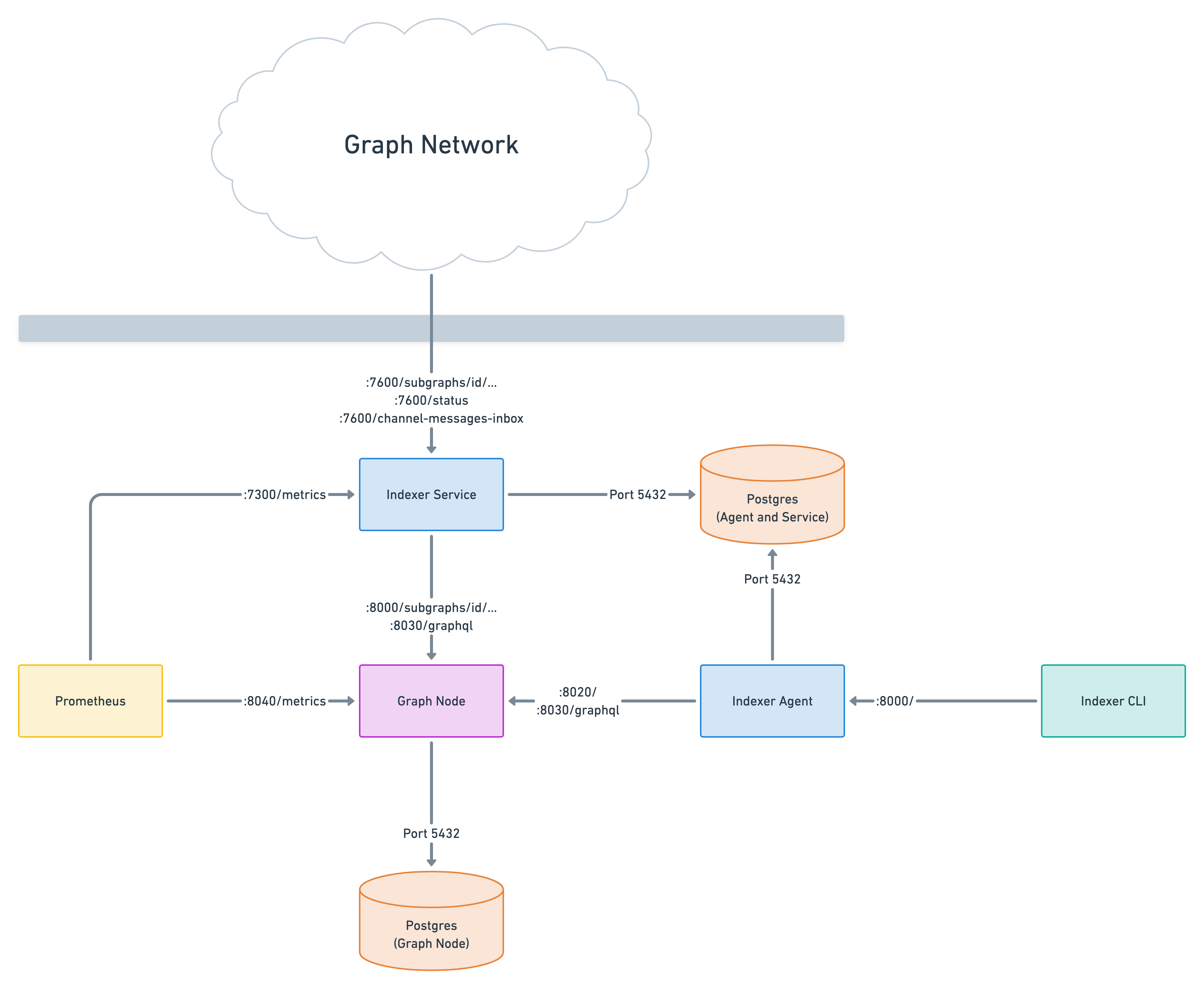
Graph Node
| Port | Purpose | Routes | CLI argument | Environment variable |
|---|---|---|---|---|
| 8000 | GraphQL HTTP server (for subgraph queries) | /subgraphs/id/... subgraphs/name/.../... | --http-port | - |
| 8001 | GraphQL WS (for subgraph subscriptions) | /subgraphs/id/... subgraphs/name/.../... | --ws-port | - |
| 8020 | JSON-RPC (for managing deployments) | / | --admin-port | - |
| 8030 | Subgraph indexing status API | /graphql | --index-node-port | - |
| 8040 | Prometheus metrics | /metrics | --metrics-port | - |
Indexer Service
| Port | Purpose | Routes | CLI argument | Environment variable |
|---|---|---|---|---|
| 7600 | GraphQL HTTP server (for paid subgraph queries) | /subgraphs/id/... /status | --port | INDEXER_SERVICE_PORT |
| 7300 | Prometheus metrics | /metrics | - | - |
Indexer Agent
| Port | Purpose | Routes | CLI argument | Environment variable |
|---|---|---|---|---|
| 8000 | Indexer management API (for graph indexer) | / | --indexer-management-port | INDEXER_AGENT_INDEXER_MANAGEMENT_PORT |
Verify the indexer is actually on the network
Containers running is not the same as earning. Check all four layers.
1. Stack
2. Deployments
Every deployment synced and healthy, all endpoint checks up.
3. Protocol state
Allocations match the rules, and no action is stuck in queued, approved
or pending.
4. From outside the host
The registered endpoint must answer publicly — the gateway reaches you through DNS, TLS and your proxy, none of which the local stack can verify for you.
Then confirm rewards eligibility is being earned, not just assumed: Monitoring tab.
Common first-run mistakes
| Symptom | Cause |
|---|---|
| No queries arrive at all | stack older than indexer-service-rs / tap-agent v2.0.0, or GraphTally sender not allow-listed |
| Paid queries rejected with HTTP 400 | max_receipt_value_grt set below the gateway's current receipt size |
| Allocation opens, then nothing happens | operator wallet out of ETH on Arbitrum One |
| Deployment stuck, chain head flat | archive RPC degraded — check it before touching graph-node |
| Rewards zero despite healthy deployments | POI went stale past 28 days, or REO eligibility not met |
| Page green locally, offline for the gateway | DNS record, TLS expiry or proxy — verify from another host |